
Numark MixTrack Go Superfader
Description and Instructions
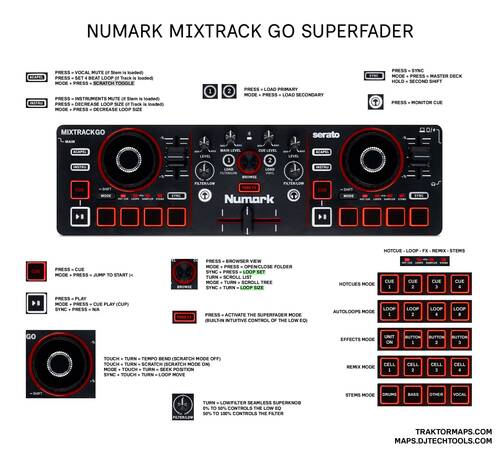
Hello fellow Traktor DJs. This custom .tsi configuration completely unlocks the ultra-compact controller inside Traktor Pro. It goes far beyond basic MIDI mapping by integrating advanced workflows, including:
Stems Control: Dedicated hardware buttons mapped directly to vocal and instrumental mutes.
Advanced Jog Navigation: Multi-layered combinations (Sync/Mode + Touch + Turn) for high-speed track seeking and loop shifting.
5-Layer Pad Engine: Full Serato-style alignment tracking Hot Cues, Auto Loops, Pad FX, Remix Decks, and dedicated Stem mutes.
Super Crossfader Mode: By combining the crossfader and Low EQ adjustment into a single control you get seemless transitions without adding more volume to your mixes.
Cut/Add Superknob: No need to switch between Low EQ and Filter control! left-side of the knob controls your Low EQ Adjust and right-side of the knob controls the FIlter Adjust in the high pass style.
MAPPING FEATURES:
Full LED feedback, Super Crossfader with built-in Low EQ control (Fade FX), 2 Shift buttons, 2-Stem Decks, 2-Track Decks, 5-Pad Modes, 4-Hotcue Triggers, Autoloops 1-2-4-8, 4-FX Buttons (FX Unit 1 and 2), 4-Sample Triggers (Remix Decks C and D), 4-Stem Mute toggles, Acapela Button (Vocal Mute), Instruments Button (Drums+Bass+Other Mute), Mixer FX Adjust (Filter), Gain Adjust, Browser, Load Primary and Secondary (Track or Stem version of the song), Cue, Play, Sync, Deck Master, Loop Set, Loop Size, Move or Loop Move, Scratch Mode Toggle, Tempo Bend, Tempo Adjust and more.
WHAT’S IN THE DOWNLOAD?
Stewe’s.MixTrack.Go.Superfader v0.1.0 TSI
Infographics JPG
Installation Guide PDF
Click on https://traktormaps.com/ if you need help with custom mappings for Traktor.
If you have questions, let me know.
Click on https://traktormaps.com/ if you need help with custom mappings for Traktor.
If you have questions, let me know.
Problem downloading or other issues? Let us know on the forum.
Comments for v0.1.0
E 25 days ago
Hey thanks so much for this mapping. I'm liking the MixTrack Go but I didn't want to use Serato. A little feedback:
- The main level and cue level knobs don't work for me
- The superknob configuration essentially just does a highpass filter in both directions. Maybe I'm in the minority here but I feel like keeping it as a combination lowpass and highpass makes more sense. I can just modify it myself but I thought I'd mention.
- Is there a reason in your instructions you recommend installing it with the big "Import" settings button instead of just adding a new controller device mapping with the "Add..." button? Doing the former wipes all of your other mappings. I was able to add yours on top of what I already had.


Stewe 25 days ago
Big import eliminates possibility of duplicates in the device menu. Thanks for your feedback mate. This is just a firs version and if there is more interest I can build multiple crossfader modes as well. Currently it is just a Low EQ mode since it is the most useful one for everybody.