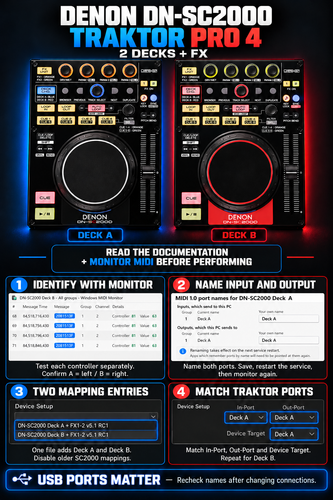
Denon DN-SC2000 – Traktor Pro 4 Mapping – 2 Decks + FX
Description and Instructions
Denon DN-SC2000 — Dual Controller Mapping v5.1.0
Tested and working. I have now tested this mapping in my own setup and can confirm that it works very well.
Control Deck A and Deck B with two Denon DN-SC2000 controllers using one TSI file. The mapping adds two entries to Traktor’s Controller Manager, each combining deck controls, FX1/FX2 controls and LED feedback.
Please follow the setup instructions below in order. Correct MIDI channels and port assignments are essential. Check the illustrated setup guide. :)
Included controls
Transport, jog and tempo controls; eight hotcues per deck with SHIFT deletion; manual and automatic looping; Beatjump; track browsing and loading; folder-tree browsing with SHIFT; Flux mode; SHIFT + PLAY for Flux Reverse; and integrated FX1/FX2 controls.
The ZIP includes a complete reference for all functions and SHIFT combinations.
Setup instructions — Windows
Download and extract the ZIP, then open the included illustrated guide.
The steps below use Windows MIDI Settings, provided with Windows MIDI Services Tools. The version used in the guide is 0.99.88-preview.10:
Intel/AMD computers: Download the x64 installer.
Windows on ARM computers: Download the ARM64 installer.
Before installing: check Microsoft’s requirements and installation notes.
1. Set up the two controllers
Keep Traktor closed while identifying and naming the MIDI ports.
Connect both controllers. Use DECK CHG to select the deck colors below, and set the initial FX UNIT colors as shown.
Both controllers must use MIDI channel pair 1/2:
| Controller | DECK CHG color | MIDI channel | Initial FX UNIT color |
|---|---|---|---|
| Left — Deck A | BLUE | 1 | YELLOW |
| Right — Deck B | RED | 2 | GREEN |
2. Identify which MIDI port belongs to each controller
Open Windows MIDI Settings and use Monitor for each Denon.
Operate one controller at a time and check which device shows incoming MIDI messages. Confirm that:
The physical left controller is Deck A and sends on channel 1.
The physical right controller is Deck B and sends on channel 2.
Do not identify the controllers by their displayed names or Windows numbering alone.
If the channels do not match, follow the channel recovery instructions below, then check both controllers again.
3. Name the input and output ports
After identifying each controller, give its input and output ports clear names.
Suggested names:
| Controller | Input port name | Output port name |
|---|---|---|
| Deck A — left | DN-SC2000-In-DeckA | DN-SC2000-Out-DeckA |
| Deck B — right | DN-SC2000-In-DeckB | DN-SC2000-Out-DeckB |
Save the changes and restart the MIDI service as described in the included guide. Then run Monitor again under the new names to confirm that each controller still matches the correct port and channel.
Renaming a port does not change its MIDI channel.
4. Import the mapping into Traktor
Open Traktor and go to Controller Manager.
Back up your existing mapping and note its port assignments.
Disable any previous DN-SC2000 mapping entries by setting both their In-Port and Out-Port to None.
Select Add > Import and import the included TSI file once.
Select each of the two new mapping entries and assign the corresponding controller’s verified In-Port and Out-Port.
Use the Deck A ports for the Deck A entry and the Deck B ports for the Deck B entry.
Avoid “All Ports” and duplicate active DN-SC2000 mappings.
5. Check both decks
Load a track into each deck and operate the controllers separately. Check transport, jog, tempo, hotcues, loops, Beatjump, FX and LED feedback.
Confirm that the left controller operates Deck A and the right controller operates Deck B. Use the included pre-show checklist before performing.
Loop and Beatjump controls — v5.1.0
Turn FILTER: select the loop length.
Press FILTER: set a loop at the selected length.
Hold SHIFT and turn FILTER: select the Beatjump size.
Press FAST SEARCH − / +: jump backward or forward by the selected Beatjump size.
Hold SHIFT and press FILTER: no action.
Loop length and Beatjump size are independent. Pressing FILTER does not reset the Beatjump size to 1.
Keep your USB connections consistent
These controllers do not report a unique serial number, so saved port names can follow the USB connection rather than the physical controller.
Label your USB connections and keep them consistent. If you move or swap the controllers or change USB ports, repeat the Monitor check before assigning Deck A and Deck B, even if the displayed names look correct.
Troubleshooting — MIDI flashes, but a deck does not respond
The controller may have switched to a different hardware MIDI channel pair. SHIFT + PREVIOUS/NEXT changes that pair.
To restore the correct channels:
On the affected controller, hold SHIFT and press BROWSE to restore channel pair 1/2.
Release SHIFT.
Use DECK CHG to restore left BLUE / right RED.
Check both controllers in Monitor: Deck A must send on channel 1, and Deck B on channel 2.
Confirm that the corresponding In-Port and Out-Port are still assigned correctly in Traktor.
Included in the ZIP
The TSI mapping file.
An illustrated setup guide.
English installation and MIDI port-naming instructions.
The complete functions and SHIFT reference.
A pre-show checklist.
Compatibility: confirmed working in my Windows setup. Other Traktor versions and macOS have not been tested.
Credits: based on the DN-SC2000 mapping shared by bascurtiz, with Stewe credited for the original InstaPadFX work.