
Xone K2 - 4deck internal & external mapping
Description and Instructions
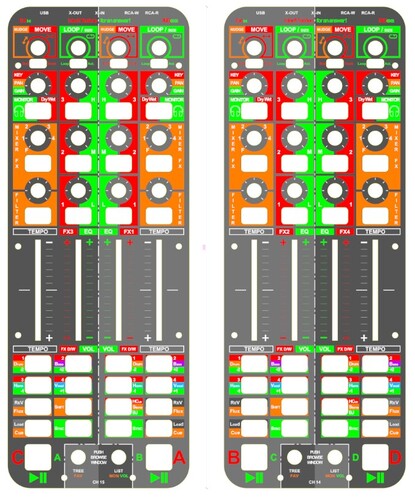
Mapping made for complete control over Traktor.
General:
- each controller is divided in 2 decks:
-> partially mirrored to achieve an intuitive feel
-> Left <-> right
-> partially mirrored to achieve an intuitive feel
-> Left <-> right
- 4 deck control (AB, ABCD or CABD setups possible)
- loop / move / nudge encoders at the top part of the controller
- load / sync / shift per deck
- Cue / Rev / Flux
- Switch between 4 Hot cues / Stems / Beat jump with the layer function button
- tempo faders
- filter / mixer fx section -> labeled orange section for each deck with kill switches
- browse: tree / list / favorites / browser view with the encoders at the bottom.
- Press shift + orange labeled functions for extra functionality or resets
-> Play/pauze: The big green led-button at the left<->right bottom
- Press shift + orange labeled functions for extra functionality or resets
-> Play/pauze: The big green led-button at the left<->right bottom
Internal mixer mode: (green led layout)
- Volume control
- EQ controls with kill switches
- Monitor / Gain
-> This mode is used when you want the use only the K2's, without an external mixer. The K2's are mapped as a complete controller with volume faders & EQ control.
This provides a quick, easy & very small setup. 1 USB connection, 1 UTP cable, your laptop & an active speaker (with battery) and you are set to go!
-> This mode is used when you want the use only the K2's, without an external mixer. The K2's are mapped as a complete controller with volume faders & EQ control.
This provides a quick, easy & very small setup. 1 USB connection, 1 UTP cable, your laptop & an active speaker (with battery) and you are set to go!
All the buttons, knobs & leds are labeled or lit green at the middle upper part of the controller.
External mixer mode: (red led layout)
- Dry/wet faders
- FX unit controls
- Key shift
-> Used with an external mixer! Here the K2's are mapped with the red functions & lit red leds.
The Red functions: FX bank control (Kill / levels) & dry wet control with the faders are alive!
-> Used with an external mixer! Here the K2's are mapped with the red functions & lit red leds.
The Red functions: FX bank control (Kill / levels) & dry wet control with the faders are alive!
Hope you like it as much as I do!
Problem downloading or other issues? Let us know on the forum.
Comments for v2.2
There are no comments for this version yet! Why don't you be the first.


