
MrJoshua's Teenage Engineering Sidekick map for DJay Pro
Description and Instructions
Here's my Teenage Engineering Sidekick map for DJay Pro.
First, configure the Sidekick for MIDI and USB Audio:
1. Go into the settings menu on the Sidekick by pressing the hidden button under the battery cover.
2. Use the orange pitch knob thing to move through the menu until you hit "MIDI", then hit the Select button.
3. Use the pitch knob to move through the options until it says mode "Control" and hit Select.
4. Go up to USB and make sure the input is set to "Multi". I also have Out turned on. Select to confirm.
5. Press the hidden button again to exit out of the settings menu. The screen should now say "Control" at the top.
On MacOS, copy this file to: HDD>Users>Name>Music>djay>MIDI Mappings
On iPhoneOS/iPadOS, copy this file to: On My iPhone/On My iPad>djay
In DJay Pro, go into Settings>Devices, and choose Mixer Mode: Internal.
Main Output: EP-136 - ch 1-2
Pre Cueing: EP-136 - ch 3-4
Alright, now to what it does...
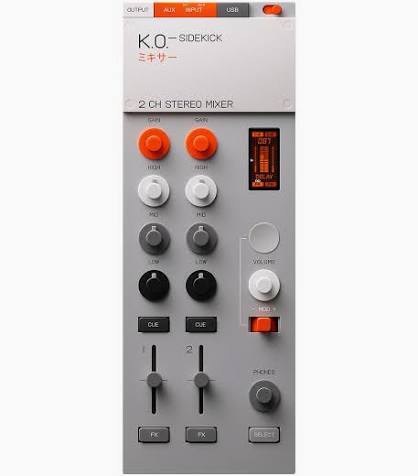
It's a two channel mixer with sound card, headphone cueing and basic transport controls.
The buttons, knobs and faders do the following:
GAIN: Moves through library.
GAIN PRESS: Load track to deck. Left is Deck 1, right is Deck 2.
SELECT + GAIN: Scrubs through track.
SELECT + GAIN PRESS: Jump to 2nd Hot Cue Position.
TREBLE, MID, BASS: Does what it says on the tin.
CUE: Turn headphone cue on and off for that deck.
SELECT + CUE: Pitch Bend. Left is -, right is +.
FADERS: Deck 1 and 2 Levels.
FX: Play/Pause Deck 1 and 2.
SELECT + FX: Select which Deck has focus for Pitch Bend and Loops.
BUTTON (Below Screen): Loop 16 Beats On/Off.
SELECT + BUTTON: Loop 32 Beats On/Off.
VOLUME: Master Volume Output.
ORANGE KNOB THING: Crossfader. Defaults to centre.
PHONES: Headphone Volume.
SELECT: Acts like Shift.
Good luck and have fun!
Problem downloading or other issues? Let us know on the forum.
Comments for v0.1.0


