
DJ2GO2touch - Traktor mapping (cue point use/set edits)
Description and Instructions
TRAKTOR 4 - Numark DJ2GO2touch mapping (SpiderSound v1.1)
This mapping is based on Jay Neural's mapping from https://maps.djtechtools.com/mappings/7753.
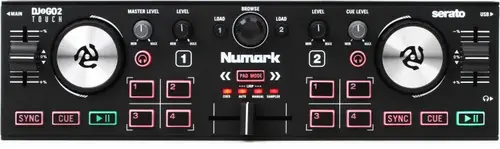
I wanted the first two map modes to simply use/set the cue points like the S2/S4 devices, instead of always setting the next cue point (even if that's some sort of Serrato default).
*** Pad Mode options (new in this mapping) ***
Pad Mode CUE:
1 - Select/Set Hotcue 1 (deck A left or B right)
2 - Select/Set Hotcue 1 (deck A left or B right)
3 - Select/Set Hotcue 1 (deck A left or B right)
4 - Select/Set Hotcue 1 (deck A left or B right)
Pad Mode AUTO:
1 - Select/Set Hotcue 6 (deck A left or B right)
2 - Select/Set Hotcue 7 (deck A left or B right)
3 - Select/Set Hotcue 8 (deck A left or B right)
4 - Select/Set Hotcue 9 (deck A left or B right)
*** LED mode to indicate active cue points ***
Reading the status is tricky because it can be "set" for various values. In the end I ended up saying to light the LED if the setting was -1 (not set) and using the INVERT option. So whenever it's NOT -1 it will be lit.
*** For reference, as this was hard to track down ***
Interpreting the State Values
Traktor uses a specific range of values to represent the state of a hot cue slot. You can view or adjust these in the Controller Range section of the mapping:
-1: No Hot Cue is set (Slot is empty).
0: Standard Cue Point
1: Fade In
2: Fade Out
3: Load
4: Grid
5: Loop
*** Examples of settings in the mappings ***
button press to use/set Cue Point 1 on Deck A
=============================================
(settings grid info)
Assignment: Select/Set+Store Hotpoint
I/O: In
Assignment: Deck A
Mode: Hold
Mapped to: Ch05.Note.C#-1
Mapping Details > Type of Controller: Button
Mapping Details > Interaction Mode: Hold
Mapping Details > Assignment: Deck A
Button Options > Set to value: Hotcue 1
LED light up if Cue Point 1 on Deck A is set
============================================
(settings grid info)
Assignment: Hotcue 1 Type
I/O: Out
Assignment: Deck A
Mode: Output
Mapped to: Ch05.Note.C#-1
Mapping Details > Type of Controller: LED
Mapping Details > Interaction Mode: Output
Mapping Details > Assignment: Deck A
LED Options > Controller Range: min -1, max -1, invert ON
LED Options > Midi Range: min 0, max 127, blend OFF
Problem downloading or other issues? Let us know on the forum.
Comments for v1.1
There are no comments for this version yet! Why don't you be the first.


