
DJ2X Z2 & Dicers Combo! FX//Macro FX/Cues (DJ2X edit)
Description and Instructions
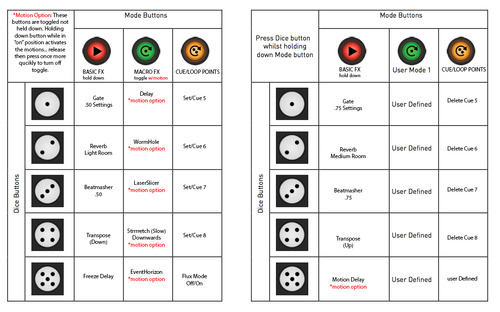
My first Mapping released online so bear with me. The mapping file also includes a larger image of the maps.
I created this mapping with the intentions of using dicers alongside a Traktor Z2 mixer. All controls work as it should using the Z2, and the Dicers are basically an extension of the mixer with very helpful controls to add more color, builds, blends, etc. to your mix.
The two main reasons why I decided to do this was simply after trying out the Z2, I loved it a lot and very easy to work with! Although I did seem to find a few things that could have been a little better and that is why I chose to remap my dicers.
1. I have added two sets of effects, your basic effects that most people would use to do cuts, drops… and a set of Macro effects which gives you excellent builds and transitions. By pressing the Macro Effects mode once will trigger the effects and give you decent sounding transitions. You can release the my full effects feel by simply holding down the Macro effects buttons in "on" mode to trigger the automation I have down with all of the Macro effects.
2. I set cue points on the last mode of the dicers to trigger the cues 5-8. Thus giving you control of all 8 cue points from both the Z2 & Dicers together rather than flipping through the Z2's 2 banks of cues. This gives me the option to really juggle my cues and create better breakdowns.
THIS MAPPING CONTROLS ONLY DECKS A & B NOT C & D.
any input, questions, or comments greatly appreciated!
If you have any questions feel free to contact me.


DJ2X about 12 years ago
Hey Matt, You can use either or. I connect it straight to my Z2 only because its more convenient for me. It doesn't mess anything up and I have been using it since I made it and still runs fine. The only thing I have noticed that was a little unstable is that sometimes one deck ends up somehow syncing to both dicers if that makes sense. I have not found a solution for it yet as I think its the speed of my laptop. What I do is simply unplug and replug one of the dicers to reset midi. Let me know if you need any more help... -DJ2X (times)