
DDJ-ERGO W/FLUXMODE and BEATJUMP and 8 HOT CUE
Description and Instructions
DDJ – ERGO V Gu3dZ Mod Mapper Vs.2,0
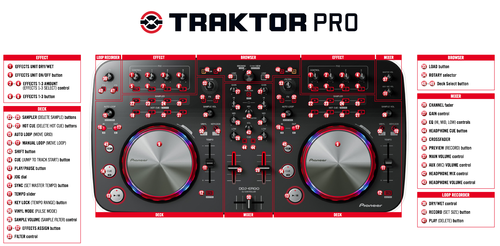
Amigos, segue a Vs. 2.0 do mapeamento para para o TRAKTOR, e a Pioneer DDJ-ERGO V/K. Nesta versão esta a funcionar: FLUX MODE, BEATJUMP, KEY ADJUST, 08 HOT CUE, UNLOAD TRACK, SEEK POSITION in PREVIEW DECK, em todos os DECKS (A,B,C,D), segue abaixo uma ligeira explicação do funcionamento deste mapeamento:
* IMPORTANTE: delete da preferencias do TRAKTOR qualquer outro MAPA referente a DDJ_ERGO FLUX MODE: DECK A: tecla numero: 47 (F2) liga/desliga o FLUXMODE no deck A, com o LED respondendo (ON/OFF). DECK B: tecla numero 48 (F3) liga/desliga o FLUXMODE no deck B, com o LED respondendo (ON/OFF). DECK C: SHIFT + tecla numero: 47 (F2) liga/desliga o FLUXMODE no deck C, com o LED NAO respondendo (ON/OFF).* DECK D: SHIFT + tecla numero 48 (F3) liga/desliga o FLUXMODE no deck D, com o LED NAO respondendo (ON/OFF).* BEATJUMP: DECK A,B e C,D tecla numero 8 (autoloop), seleciona o tamanho desejado para o BEATJUMP (ex.: 2,4,8,...32), a tecla 10 (out) faz o BEATJUMP para frente de acordo com a seleção escolhida, a tecla 9 (in) faz o BEATJUMP para traz de acordo com a seleção escolhida.**
KEY (tone) ADJUST:
tecla numero 49 do DECK correspondente (A/C e B/D) e use o Knob (sample vol ) para ajustar, sentido horário aumenta o KEY antihorario diminui o KEY ao pressionar a tecla (49) zera o valor.
UNLOAD TRAK:
tecla SHIFT + tecla LOAD do DECK correspondente A/C e B/D
SEEK POSITION:
após carregar a track no Preview Deck use o DIAL (17) para mover a posicao na TRACK, sentido horário avança, sentido anti-horário retrocede.
HOT CUE:
teclas (05 06 07 08 dos SAMPLE DECKS), use como os 04 HOT CUE originais, aperte para MARCAR o HOT CUE e use SHIFT + TECLA para deletar o HOT CUE
Funções pedidas com esta modificação do mapeamento original: Gravação e utilização da gravação de LOOPs (teclas F2, F3 e F1***) Nao e mais possivel mover o LOOP pela track / grid (teclas SHIFT -9 IN e 10- OUT).
Não se tem mais as funções do REMIX DECKS, que já não tinha muita função na ERGO
OBJETIVOS A SEREM FEITOS: - Ativar a resposta dos LEDs ao se ativar o FLUX MODE nos DECKs C/D. - Melhorar a resposta e precisão dos JOGs. Para isso preciso da ajuda e colaboração de vocês para trocarmos ideias de como fazer esta modificações. *= BUG que ainda noa sei como resolver. **= Funciona apenas no modo TRACK DECK. ***= Sacrifiquei estas funções por achar desnecessárias no uso da controladora, podendo as mesmas serem realizadas pelo teclado do computador. E espero o feedback de todos. Lets play!
Segue mais uma vs do meu Mapa modificado para a DDJ-ERGO V/K, as caractaristicas deste Mapa são:
− 08 Hot Cue
− Flux Mode ON/OFF em todos os Decks
− Beat Jump
− KEY Adjust para todos os Decks
DDJ - ERGO V Gu3dZ Mod Mapper Vs.2, 0 Friends follows the Vs 2.0 Mapping to for the TRAKTOR and Pioneer DDJ-ERGO V / K. In this version this working: FLUX MODE, BEATJUMP, KEY ADJUST, 08 HOT CUE, UNLOAD TRAK, SEEK TRACK POSITION IN PREVIEW DECK at all DECKS (A, B, C, D), below is a slight explanation of the operation of this mapping :
* IMPORTANT: delete any Mapper for DDJ-ERGO of TRAKTOR prference panel. FLUX MODE: DECK A: Key number: 47 (F2) ON/OFF the FLUXMODE on deck A, responding with LED (ON / OFF). DECK B: key number 48 (F3) ON/OFF the FLUXMODE on deck B, responding with LED (ON / OFF). DECK C: SHIFT key + KEY number: 47 (F2) ON/OFF the deck FLUXMODE in C, NO LED responding (ON / OFF). * DECK D: SHIFT key + KEY number 48 (F3) ON/OFF the deck FLUXMODE in D, NO LED responding (ON / OFF). * BEATJUMP: DECK A, B, C, D KEY number 8 (Autoloop), select the desired size for the BEATJUMP (eg 2,4,8, ... 32), the KEY 10 (out) does BEATJUMP forward according to the selected setting, the KEY 9 (in) makes BEATJUMP backwards according to the selected setting. ** KEY (tone) ADJUST: KEY number (49) in corresponds DECK (A / B and C / D) and use Knob (49-sample volume) to adjust, clockwise increases the KEY counterclockwise decreases the KEY to the press (49) resets the value. UNLOAD TRAK: SHIFT + LOAD button in corresponding DECK A / B and C / D SEEK POSITION: after loading the track in Deck Preview use the DIAL (17) to move the position in TRACK, moves clockwise increases TRACK position counterclockwise decreases TRACK position (Thanks for Sprike, this function are made in hes Mapper). HOT CUE: KEYs (35,36,37,38) of SAMPLE DECKS), use 04 as defalt original HOT CUE, press KEY to the SELECT/STORE HOT CUE and use SHIFT + KEY to DELET the HOT CUE Functions requested (LOOSE) with this modification of the original mapping: Recording and use of loop recording (F2, F3 and F1 ***) It is not possible to move over the track LOOP / grid (SHIFT IN -9 and 10 - OUT). No one has more functions REMIX-DECKS who has had little role in ERGO OBJECTIVES TO BE MADE: - Enable the response of LEDs to enabling FLUX MODE on decks C / D. - Improve the responsiveness and accuracy of JOGs. For this I need the help and cooperation of you to exchange ideas on how to make this modification. * BUG = noa still know how to solve. = ** Works only mode TRACK DECK. = *** Sacrificed these functions for finding unneeded use of the parent, the same can be performed by the computer keyboard. And I hope the your like and all feedback is welcome. Lets play! Follows another vs my modified map for DDJ-ERGO V / K, the caractaristicas this map are: - 08 Hot Cue - Flux Mode ON / OFF on all Decks - Beat Jump - Adjust KEY to all Decks
- Unlod Track
- Seek Track position
Sory my bad Inglish.
***Google Tradutor para empresas:Google Translator ToolkitTradutor de sitesGlobal Market Finder
Amigos, segue a Vs. 2.0 do mapeamento para para o TRAKTOR, e a Pioneer DDJ-ERGO V/K. Nesta versão esta a funcionar: FLUX MODE, BEATJUMP, KEY ADJUST, 08 HOT CUE, UNLOAD TRACK, SEEK POSITION in PREVIEW DECK, em todos os DECKS (A,B,C,D), segue abaixo uma ligeira explicação do funcionamento deste mapeamento:
* IMPORTANTE: delete da preferencias do TRAKTOR qualquer outro MAPA referente a DDJ_ERGO FLUX MODE: DECK A: tecla numero: 47 (F2) liga/desliga o FLUXMODE no deck A, com o LED respondendo (ON/OFF). DECK B: tecla numero 48 (F3) liga/desliga o FLUXMODE no deck B, com o LED respondendo (ON/OFF). DECK C: SHIFT + tecla numero: 47 (F2) liga/desliga o FLUXMODE no deck C, com o LED NAO respondendo (ON/OFF).* DECK D: SHIFT + tecla numero 48 (F3) liga/desliga o FLUXMODE no deck D, com o LED NAO respondendo (ON/OFF).* BEATJUMP: DECK A,B e C,D tecla numero 8 (autoloop), seleciona o tamanho desejado para o BEATJUMP (ex.: 2,4,8,...32), a tecla 10 (out) faz o BEATJUMP para frente de acordo com a seleção escolhida, a tecla 9 (in) faz o BEATJUMP para traz de acordo com a seleção escolhida.**
KEY (tone) ADJUST:
tecla numero 49 do DECK correspondente (A/C e B/D) e use o Knob (sample vol ) para ajustar, sentido horário aumenta o KEY antihorario diminui o KEY ao pressionar a tecla (49) zera o valor.
UNLOAD TRAK:
tecla SHIFT + tecla LOAD do DECK correspondente A/C e B/D
SEEK POSITION:
após carregar a track no Preview Deck use o DIAL (17) para mover a posicao na TRACK, sentido horário avança, sentido anti-horário retrocede.
HOT CUE:
teclas (05 06 07 08 dos SAMPLE DECKS), use como os 04 HOT CUE originais, aperte para MARCAR o HOT CUE e use SHIFT + TECLA para deletar o HOT CUE
Funções pedidas com esta modificação do mapeamento original: Gravação e utilização da gravação de LOOPs (teclas F2, F3 e F1***) Nao e mais possivel mover o LOOP pela track / grid (teclas SHIFT -9 IN e 10- OUT).
Não se tem mais as funções do REMIX DECKS, que já não tinha muita função na ERGO
OBJETIVOS A SEREM FEITOS: - Ativar a resposta dos LEDs ao se ativar o FLUX MODE nos DECKs C/D. - Melhorar a resposta e precisão dos JOGs. Para isso preciso da ajuda e colaboração de vocês para trocarmos ideias de como fazer esta modificações. *= BUG que ainda noa sei como resolver. **= Funciona apenas no modo TRACK DECK. ***= Sacrifiquei estas funções por achar desnecessárias no uso da controladora, podendo as mesmas serem realizadas pelo teclado do computador. E espero o feedback de todos. Lets play!
Segue mais uma vs do meu Mapa modificado para a DDJ-ERGO V/K, as caractaristicas deste Mapa são:
− 08 Hot Cue
− Flux Mode ON/OFF em todos os Decks
− Beat Jump
− KEY Adjust para todos os Decks
DDJ - ERGO V Gu3dZ Mod Mapper Vs.2, 0 Friends follows the Vs 2.0 Mapping to for the TRAKTOR and Pioneer DDJ-ERGO V / K. In this version this working: FLUX MODE, BEATJUMP, KEY ADJUST, 08 HOT CUE, UNLOAD TRAK, SEEK TRACK POSITION IN PREVIEW DECK at all DECKS (A, B, C, D), below is a slight explanation of the operation of this mapping :
* IMPORTANT: delete any Mapper for DDJ-ERGO of TRAKTOR prference panel. FLUX MODE: DECK A: Key number: 47 (F2) ON/OFF the FLUXMODE on deck A, responding with LED (ON / OFF). DECK B: key number 48 (F3) ON/OFF the FLUXMODE on deck B, responding with LED (ON / OFF). DECK C: SHIFT key + KEY number: 47 (F2) ON/OFF the deck FLUXMODE in C, NO LED responding (ON / OFF). * DECK D: SHIFT key + KEY number 48 (F3) ON/OFF the deck FLUXMODE in D, NO LED responding (ON / OFF). * BEATJUMP: DECK A, B, C, D KEY number 8 (Autoloop), select the desired size for the BEATJUMP (eg 2,4,8, ... 32), the KEY 10 (out) does BEATJUMP forward according to the selected setting, the KEY 9 (in) makes BEATJUMP backwards according to the selected setting. ** KEY (tone) ADJUST: KEY number (49) in corresponds DECK (A / B and C / D) and use Knob (49-sample volume) to adjust, clockwise increases the KEY counterclockwise decreases the KEY to the press (49) resets the value. UNLOAD TRAK: SHIFT + LOAD button in corresponding DECK A / B and C / D SEEK POSITION: after loading the track in Deck Preview use the DIAL (17) to move the position in TRACK, moves clockwise increases TRACK position counterclockwise decreases TRACK position (Thanks for Sprike, this function are made in hes Mapper). HOT CUE: KEYs (35,36,37,38) of SAMPLE DECKS), use 04 as defalt original HOT CUE, press KEY to the SELECT/STORE HOT CUE and use SHIFT + KEY to DELET the HOT CUE Functions requested (LOOSE) with this modification of the original mapping: Recording and use of loop recording (F2, F3 and F1 ***) It is not possible to move over the track LOOP / grid (SHIFT IN -9 and 10 - OUT). No one has more functions REMIX-DECKS who has had little role in ERGO OBJECTIVES TO BE MADE: - Enable the response of LEDs to enabling FLUX MODE on decks C / D. - Improve the responsiveness and accuracy of JOGs. For this I need the help and cooperation of you to exchange ideas on how to make this modification. * BUG = noa still know how to solve. = ** Works only mode TRACK DECK. = *** Sacrificed these functions for finding unneeded use of the parent, the same can be performed by the computer keyboard. And I hope the your like and all feedback is welcome. Lets play! Follows another vs my modified map for DDJ-ERGO V / K, the caractaristicas this map are: - 08 Hot Cue - Flux Mode ON / OFF on all Decks - Beat Jump - Adjust KEY to all Decks
- Unlod Track
- Seek Track position
Sory my bad Inglish.
***Google Tradutor para empresas:Google Translator ToolkitTradutor de sitesGlobal Market Finder
Problem downloading or other issues? Let us know on the forum.
Comments for v2.0.0
Cristiano Taddei over 12 years ago
Oi Gu3dz, td bem?
Excelente esse seu post hein.
So que estou com um problemasso. Meu Traktor não me da a opção de editar ou criar novo mapping. Sabe me dizer o que pode ser isso? Conhece alguem que passou por este problema?
Vlww


Gu3dZ over 12 years ago
amigo qual vs. do traktor vc esta usando? que modificacoes vc pretende fazer? eu perticulamente uso o xtrem mapping pra trabalhar com mapas.