
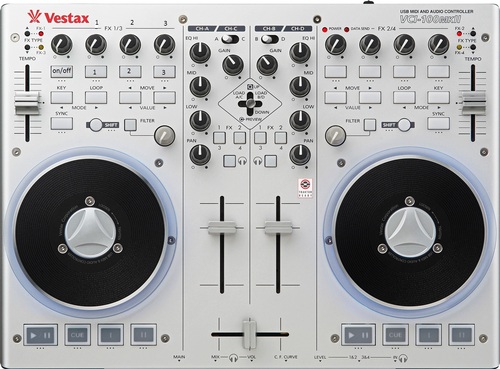
Vestax vci100mk2 with Isolator Effect
Description and Instructions
on/off= duplicates deck a or b into deck d / turn off frequency selection
button 1 = select high frequency
button 2 = select mid frequency
button 3 = select low frequency
at first you have to press on/off.
then you select the frequency on which you want to apply the effect.
you have to activete the effect from another device.
finally press again on/off to eliminate the frequency selection.
note1 = you need to be in fx group mode in traktor.
note 2 = to duplicate decks in deck d it must be in pause, not playing.
knobs 1 2 3 adjust high mid and low freq on deck d
buttons highlighted in the image are mapped in the same way on deck b.
IMPORTANT= this is my own modded vci100mk2 mapping, ive altered some other functions on this mapping.this mapping is meant only to demostrate a solution to apply the rmx1000 isolator effect.
If you are using a midi fighter instant gratification mapping in 4 banks mode, to affect only the selected freq you must focus un deck D (4th botton in the first row). if you select deck A or B you will affect the other freq.
for example :
you select mid freq (button2) , then focus on deck D will affect only mid freq.
instead if you focus on deck A it will affect high and low freq.
button 1 = select high frequency
button 2 = select mid frequency
button 3 = select low frequency
at first you have to press on/off.
then you select the frequency on which you want to apply the effect.
you have to activete the effect from another device.
finally press again on/off to eliminate the frequency selection.
note1 = you need to be in fx group mode in traktor.
note 2 = to duplicate decks in deck d it must be in pause, not playing.
knobs 1 2 3 adjust high mid and low freq on deck d
buttons highlighted in the image are mapped in the same way on deck b.
IMPORTANT= this is my own modded vci100mk2 mapping, ive altered some other functions on this mapping.this mapping is meant only to demostrate a solution to apply the rmx1000 isolator effect.
If you are using a midi fighter instant gratification mapping in 4 banks mode, to affect only the selected freq you must focus un deck D (4th botton in the first row). if you select deck A or B you will affect the other freq.
for example :
you select mid freq (button2) , then focus on deck D will affect only mid freq.
instead if you focus on deck A it will affect high and low freq.
Problem downloading or other issues? Let us know on the forum.
Comments for v1.0.3
There are no comments for this version yet! Why don't you be the first.
Comments for v1.0.2
Comments for v1.0.1
Comments for v1.0.0


alexblade92 almost 13 years ago
of course. ill make a demonstration as soon as i can.